
Download Finmav1 1 4 – secure offline‑first finance management app, budgeting, free trial
Overview
Finmav1 1 4, marketed under the name Finma, is a subscription‑based finance‑management platform that puts privacy and control at the forefront. Unlike traditional cloud‑centric budgeting tools, Finma runs as a progressive web app (PWA) that processes every transaction, categorisation, and visualisation locally in the browser. This offline‑first design means that your sensitive banking data never leaves your device unless you explicitly export an encrypted backup to a cloud storage of your choice.
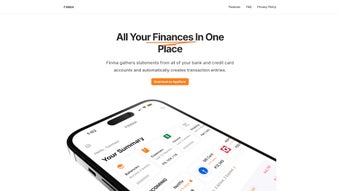
The app aggregates bank statements, credit‑card feeds, and even email receipts into a single, searchable vault, automatically generating transaction entries and applying user‑defined tagging rules. Its budget‑alert system notifies you when you approach spending limits, while proactive bill‑reminder notifications help you avoid late‑fee penalties. Visual learners benefit from an array of interactive charts—bar, pie, heat‑map, and trend lines—that can be filtered by date range, merchant, or category with a single click.
The interface is built for both desktop and mobile use; on touch devices a “Pull to Reach” gesture reveals hidden controls, and a built‑in dark‑mode reduces eye strain during late‑night budgeting sessions. In short, Finma is more than a ledger; it acts as a personal finance coach that operates entirely offline, safeguards your data, and presents information in a way that encourages smarter money habits. Whether you are a casual spender looking to track daily expenses or a power user managing multiple investment accounts, Finma’s flexible architecture adapts to your needs while keeping your financial life secure.
Key Features & User Experience
- Automatic Transaction Import: Connect multiple banks and credit‑cards; Finma scrapes statements locally and creates entries without transmitting raw data to external servers.
- Rule‑Based Auto‑Tagging: Define custom tagging patterns (e.g., “Starbucks → Coffee”) that the engine applies in real‑time to keep your ledger tidy.
- Budget Alerts & Bill Reminders: Set category‑specific caps and receive push, email, or in‑app notifications when thresholds are approached or bills are due.
- Interactive Visual Analytics: Drill down into spending with bar, pie, line, and heat‑map charts powered by D3.js, complete with smooth transitions and hover‑over details.
- Customisable Dashboard Widgets: Drag‑and‑drop widgets for net worth, cash‑flow, upcoming payments, or investment performance onto a home screen that updates instantly.
- Pull‑to‑Reach Navigation: Single‑hand swipe gestures on tablets and phones reveal hidden controls, while desktop users can click‑and‑drag widget edges for the same functionality.
- Dark Theme & Accessibility Options: High‑contrast mode, scalable fonts, keyboard shortcuts, and screen‑reader friendly labels ensure inclusive use.
- Email Expense Tracking: Forward receipts to a unique Finma address; the app extracts merchant, amount, and date automatically.
- Privacy‑First Architecture: All processing occurs locally; encrypted backups can be stored on any user‑chosen cloud provider.
- Multi‑Currency Support & Live Rates: Convert foreign‑exchange transactions automatically with daily rate updates.
Why These Features Matter
Data privacy is a growing concern, and Finma’s offline‑first approach directly addresses that anxiety. By keeping every calculation and categorisation inside the browser’s IndexedDB, the app eliminates the attack surface that cloud‑only solutions expose. Users therefore avoid the risk of large‑scale data breaches that have plagued many popular budgeting platforms. The rule‑based auto‑tagging feature dramatically reduces manual entry time; instead of painstakingly categorising each transaction, users define a handful of patterns that the engine applies automatically to both historical and future data. This frees up mental bandwidth for higher‑level financial analysis.
The visual analytics suite is another differentiator. Traditional finance apps often present static tables that can be overwhelming. Finma’s interactive charts let users explore spending trends by month, quarter, or year, and instantly spot anomalies such as a recurring subscription that was forgotten. Because the charts are rendered client‑side, there is no latency, even on large data sets, and users can experiment with filters without waiting for server responses. The Pull‑to‑Reach gesture, while subtle, showcases Finma’s commitment to ergonomic design on mobile devices, reducing the number of taps needed to access advanced controls.
Finally, the customizable widget dashboard creates a unified workspace. Novice users can start with a simple net‑worth widget, while seasoned accountants can assemble a multi‑widget view that includes cash‑flow projections, debt amortisation schedules, and investment performance graphs. This modular approach removes the need for separate tools, consolidating all essential financial insights into a single, secure environment.
Installation, Compatibility & Usage Instructions
Finma is distributed as a progressive web app (PWA), which means you can download and install it directly from your web browser without navigating an app store. Follow the step‑by‑step guide below to get up and running on any device.
- Visit the Official Download Page: Open finma.com/download on a supported browser (Chrome, Edge, Firefox, or Safari).
- Trigger the Install Prompt: When the site detects PWA compatibility, a banner appears in the top‑right corner labeled “Install Finma.” Click the banner, or press Ctrl + S (Windows) / ⌘ + S (macOS) to add the app to your desktop or start menu.
- Create Your Account: Provide a valid email address, choose a strong password, and optionally enable two‑factor authentication (2FA) via an authenticator app for added security.
- Link Financial Sources: Navigate to the “Accounts” tab, click “Add New,” and select your bank or credit‑card provider from the dropdown. Finma uses a secure OAuth flow that never stores your credentials on its servers; the authentication token is kept locally and refreshed automatically.
- Set Up Auto‑Tagging Rules: Go to Settings → Tagging Rules. Add patterns such as “Uber → Transport” or “Netflix → Entertainment.” Save the rules; the engine will retroactively apply them to existing transactions and continuously to new entries.
- Configure Budgets & Alerts: Under the “Budget” section, allocate monthly caps for categories like “Groceries,” “Travel,” and “Utilities.” Enable push notifications, email alerts, or in‑app banners for threshold breaches.
- Explore the Custom Dashboard: Drag widgets from the library onto the home screen. Use the “Pull to Reach” gesture on touch devices to reveal hidden controls for each widget, such as quick‑edit, filter, or export options.
- Backup Your Data Securely: Export an encrypted JSON backup from Settings → Backup. Store the file on a cloud service of your choice (Google Drive, Dropbox, OneDrive) or on an external hard drive. The backup is AES‑256 encrypted and can be restored on any device using the same password.
- Update Management: Finma’s service worker checks for updates each time you reconnect to the internet. When a new version is available, it downloads in the background and prompts you to refresh the app, ensuring you always have the latest security patches without manual intervention.
Supported Operating Systems: Because Finma runs in the browser, it works on Windows 10/11, macOS 12 and newer, popular Linux distributions (Ubuntu, Fedora, Debian) with a modern desktop environment, as well as iOS 14 + and Android 10 + when accessed via Chrome or Safari. The PWA installation process adapts to each platform, creating native‑like shortcuts in the Start menu, Dock, or home screen, and supports offline usage after the initial download.
Once installed, the app behaves like a native program: you can pin it to the taskbar, launch it from the desktop, and even set it to run at system startup. All data remains encrypted locally, and any synchronization across devices relies solely on the user‑initiated backup import/export workflow, guaranteeing that you retain full control over your financial information.
Pros, Cons & Frequently Asked Questions
Pros
- Full local processing ensures that sensitive financial data never leaves your device.
- Automatic transaction import and rule‑based auto‑tagging drastically reduce manual data entry.
- Rich, interactive visual analytics help users quickly understand spending patterns.
- Cross‑platform PWA works seamlessly on Windows, macOS, Linux, iOS, and Android.
- Customizable widget dashboard provides a personalised overview of your finances.
- Pull‑to‑Reach gesture enhances single‑handed navigation on tablets and smartphones.
- Secure, user‑controlled backup options with AES‑256 encryption.
- 14‑day free trial with full feature access, no credit‑card required.
Cons
- Subscription model may deter users seeking a completely free solution.
- Initial account linking can be cumbersome for banks that lack modern OAuth support.
- Advanced features such as multi‑currency conversion and premium widgets are locked behind higher‑tier plans.
- No native desktop client; performance depends on browser capabilities for very large data sets.
- Learning curve for users unfamiliar with progressive web apps or offline‑first concepts.
FAQ
Is Finma really offline‑first?
Yes. All data processing, tagging, and analytics happen locally in the browser using IndexedDB. The app only contacts your bank during the OAuth import step, and no transaction data is stored on Finma’s servers.
Can I use Finma on multiple devices?
Absolutely. Export an encrypted backup from one device and import it on another. As long as you keep the same password, your data stays synchronized across all installations.
What payment methods does the subscription accept?
Finma accepts major credit cards, PayPal, and Apple/Google Pay. All transactions are processed via Stripe, which complies with PCI‑DSS standards.
How does the “Pull to Reach” feature work on desktop?
On desktop, the same functionality is accessed by clicking and dragging the right edge of a widget. This reveals hidden controls such as quick‑edit, filter, or export options.
Is there a free trial before I commit to a subscription?
Finma offers a 14‑day free trial with full feature access. No credit card is required; you can cancel anytime from the account dashboard.
Can I integrate Finma with third‑party accounting software?
Finma provides an export function that generates CSV or OFX files, which can be imported into most major accounting packages such as QuickBooks, Xero, or Wave.
Conclusion & Call to Action
Finmav1 1 4 (Finma) delivers a rare blend of privacy, automation, and visual insight that many finance apps simply cannot match. Its offline‑first architecture gives peace of mind, while rule‑based auto‑tagging and proactive budget alerts keep day‑to‑day money management effortless. The PWA delivery model means you can install it on any device you already own, and the customizable dashboard ensures the information you need is always front and centre. For users who demand security without sacrificing usability, Finma stands out as a modern, privacy‑first alternative to cloud‑centric competitors.
If you’re ready to take control of your finances without handing over your data to a third‑party server, start your 14‑day free trial today. Explore the widget suite, set up your first budget, and watch as raw bank statements transform into actionable financial intelligence.
Ready to take charge of your money? Download Finma now, create your account, and experience secure, offline budgeting like never before.
Overall Rating: 4.5 / 5



.png)



